Our PDF to Word online converter makes PDF to Word conversion fast and accurate. This free PDF to Word converter translates PDF files into editable Word documents while keeping formatting whenever possible. Edit contracts, reports, resumes or forms online. The PDF to Word converter lets you to work quicker without rebuilding the document. PDF to Word OCR easily extracts text from scanned PDFs and makes it editable. Upload your file, convert it in seconds and download an editable DOCX document immediately – no software installation or account needed.
No of Files: 0
Actions
Please Upload Files
Very Poor
Bad
Satisfied
Good
Excellent
Help us improve
Very Poor
Bad
Satisfied
Good
Excellent
How to Convert PDF to Word Online in 3 Simple Steps
No learning curve here. Three steps are all it takes:
Step 1: Upload your PDF
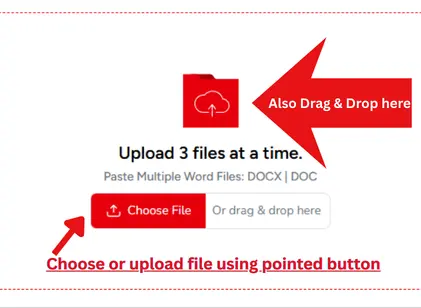
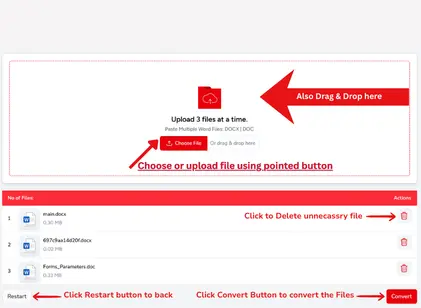
First, upload the PDF file that you need to convert. You can drag & drop the file into the upload section or browse your device to select it manually. Solutions Pedia PDF to Word online converter securely & fastly converts your document, whether it's a report, contract, resume, form, or another kind of PDF. The upload is quick, fast, and no software installation is required.
Step 2: Translate PDF to Editable Word Document
Once your file is uploaded, this free PDF to Word converter begins the PDF to Word conversion process by clicking the button "Convert to Word". It transforms your PDF into an editable Word document while preserving formatting whenever possible. If your file has scanned pages and OCR is supported, the converter will also extract editable text to improve accuracy.
Step 3: Download Your Word Document (Editable)
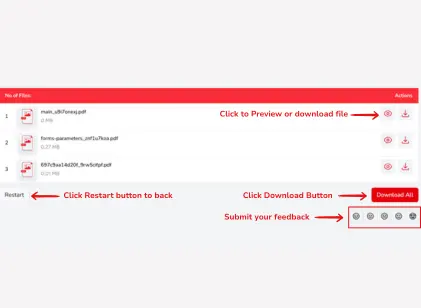
After the conversion is finished, download your editable DOCX file with a single click. Open it in Microsoft Word, Google Docs, LibreOffice, or any supported word processor to make changes immediately. Our PDF to Word online converter helps you save time by creating a document that's ready for editing without unnecessary steps.
Features of PDF to DOCX Converter Online
PDF to DOCX converter was built to fix it. Upload your PDF and receive the editable Word document. Get on with your day. No login, no download, no waiting around. Works on any device you're using right now.
Batch Convert PDF to Word:
Our PDF to Text converter supports batch mode conversion of up to three files at a time. Instead of repeating the same process for every document, convert them together and receive individual editable DOCX files. This is a great way to better organize reports, contracts, invoices, resumes and other papers.
Keeps formatting:
A decent PDF to Word document converter should make your document look like it was supposed to be. Our application keeps text, headings, tables, photos, spacing and page layout where possible, so you don't have to spend hours formatting everything manually. It’s a Word document that you can modify and update and share.
Built-In Document Preview:
Before downloading, preview your converted DOCX file directly in your browser. You may rapidly verify content, formatting and layout before saving. This is quite important if you are converting numerous files, as the preview function will help you to make sure each document is ready to go.
User friendly & Easy to Use:
Our PDF to Word OCR is for anyone. Upload your PDF, start the PDF to Word conversion and receive your editable document. No complicated settings or technical experience needed. Its clear layout makes each step simple so that your conversions are rapid whether you are a first time or regular user.
Speed & Security:
When it comes to important documents, speed matters. Our PDF to Word OCR Converter Free converts your files in just a seconds. Your papers are safe and secret, as uploaded PDFs and converted DOCX files are automatically deleted after processing.
Flexible PDF Download Options:
You can save the converted DOCX files individually, or click on the Download All option after batch conversion to save all of the files with one click. Whether you’re converting one PDF or several, our PDF to Word online tool helps you get the job done right away and keep your workflow organized.
Use our PDF to DOCX Online tool to convert your PDF into an editable Word document in seconds. Simply upload your PDF, convert it, and download the DOCX file to add, edit, or reuse the content in Microsoft Word.
How to Edit a PDF File in Word?
Edit a PDF in Word by first converting it with our Change PDF to Doc tool. Upload your PDF, download the editable DOCX file, and make changes easily in Microsoft Word while preserving formatting whenever possible.
Can I upload my files securely?
Yeah, Your privacy and safety comes first! All of the files are safe in a secure environment, and after conversion, your files will be permanently erased. We will keep your info straight.
How do I convert a really large PDF?
Yes, our free PDF to DOC/DOCX converter is able to process large files from around 5 MBs to several GBs. No matter if your PDF document is only a page or larger, our system is able to convert it into an editable word doc without problems.
How to Convert PDF to Word on mac?
Go to the Solutions Pedia PDF to Word tool, upload your PDF from your Mac, and click Convert. Download the editable DOCX file and open it in Microsoft Word, Pages, or any compatible word processor.
How to Convert PDF to Text file?
Go to the
PDF to text Tool
and upload your PDF file. Our tool uses OCR technology to extract text, allowing you to copy, expand, or download the extracted content as a .txt file in seconds.

 Word to PDF
 PDF to Word
 PNG to PDF
 JPG to Word
 Text to PDF
 Extract Text From PDF
 QR Code Scanner
 Compress Image
 Text Repeater