Convert JPG, PNG, WEBP, GIF, BMP, TIFF, HEIC & JFIF image to PDF online for free. Simply add pictures to PDF, scan image to PDF, crop images, merge multiple images into one PDF, & modify page size, margins & portrait or landscape orientation — all in one fast and secure Image to PDF Converter.
Files 0
Actions
Please Upload Files
Page Orientation
Very Poor
Bad
Satisfied
Good
Excellent
Help us improve
Very Poor
Bad
Satisfied
Good
Excellent
How to Use Our Image to PDF Converter
Converting images into a PDF is quick and hassle-free. Our free Image to PDF Converter lets you do it in just three simple steps. No software installation, registration, or technical skills are required.
Upload Your Image:
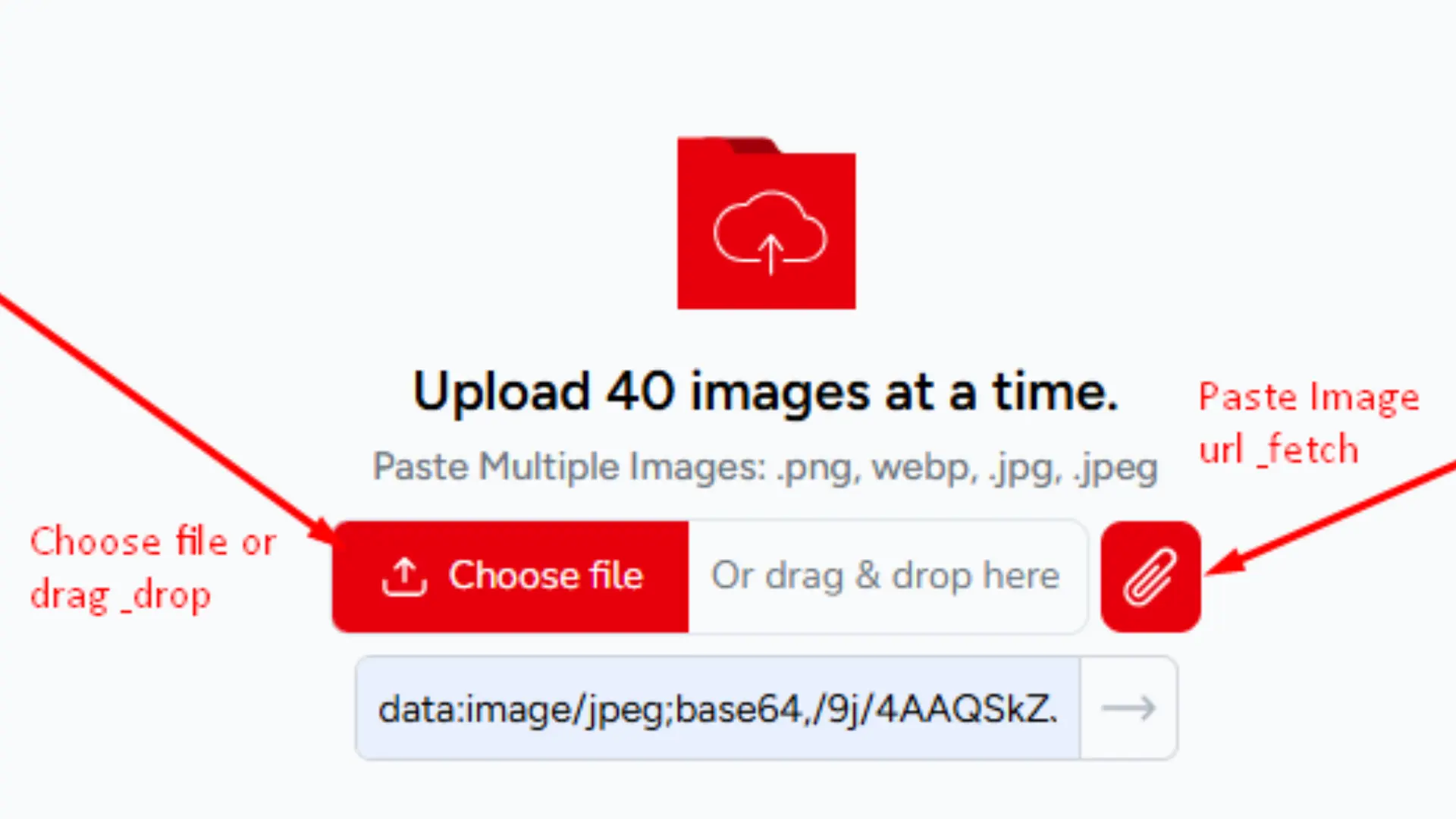
Click the Choose File button or drag your images straight into the upload box. You can add up to 40 images at once, JPG, PNG, WEBP, HEIC, BMP, GIF, and TIFF all work. If you have images saved online or pulled from social media, paste a direct image URL, and the tool fetches it for you.
Convert to PDF:
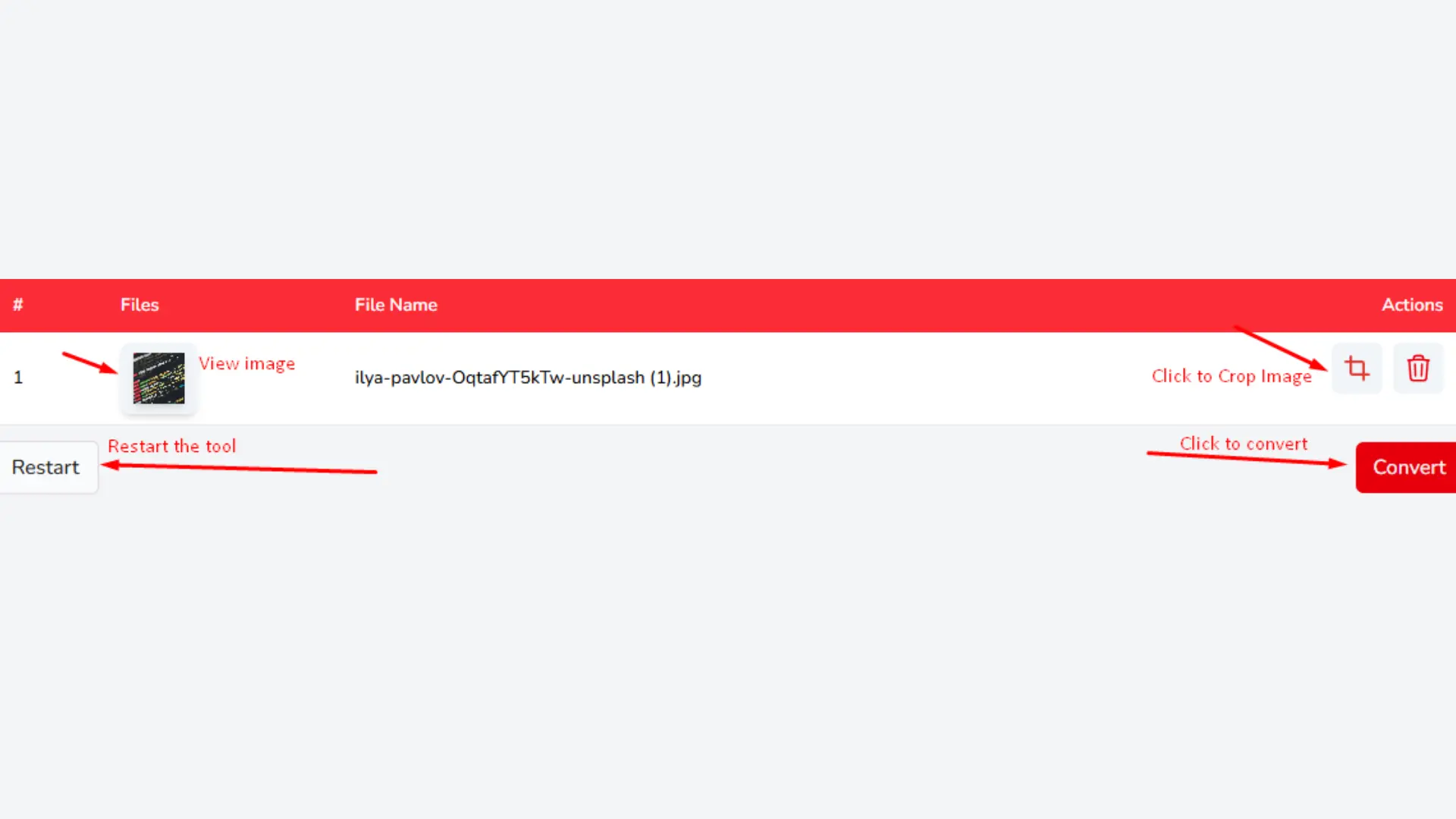
When your images have loaded, click Convert. Processes everything on the spot, no queue, no waiting for confirmation email. Most turns less than ten seconds. You will see a page preview before the final file is ready so you can catch any order issues before you download.
Download Your PDF:
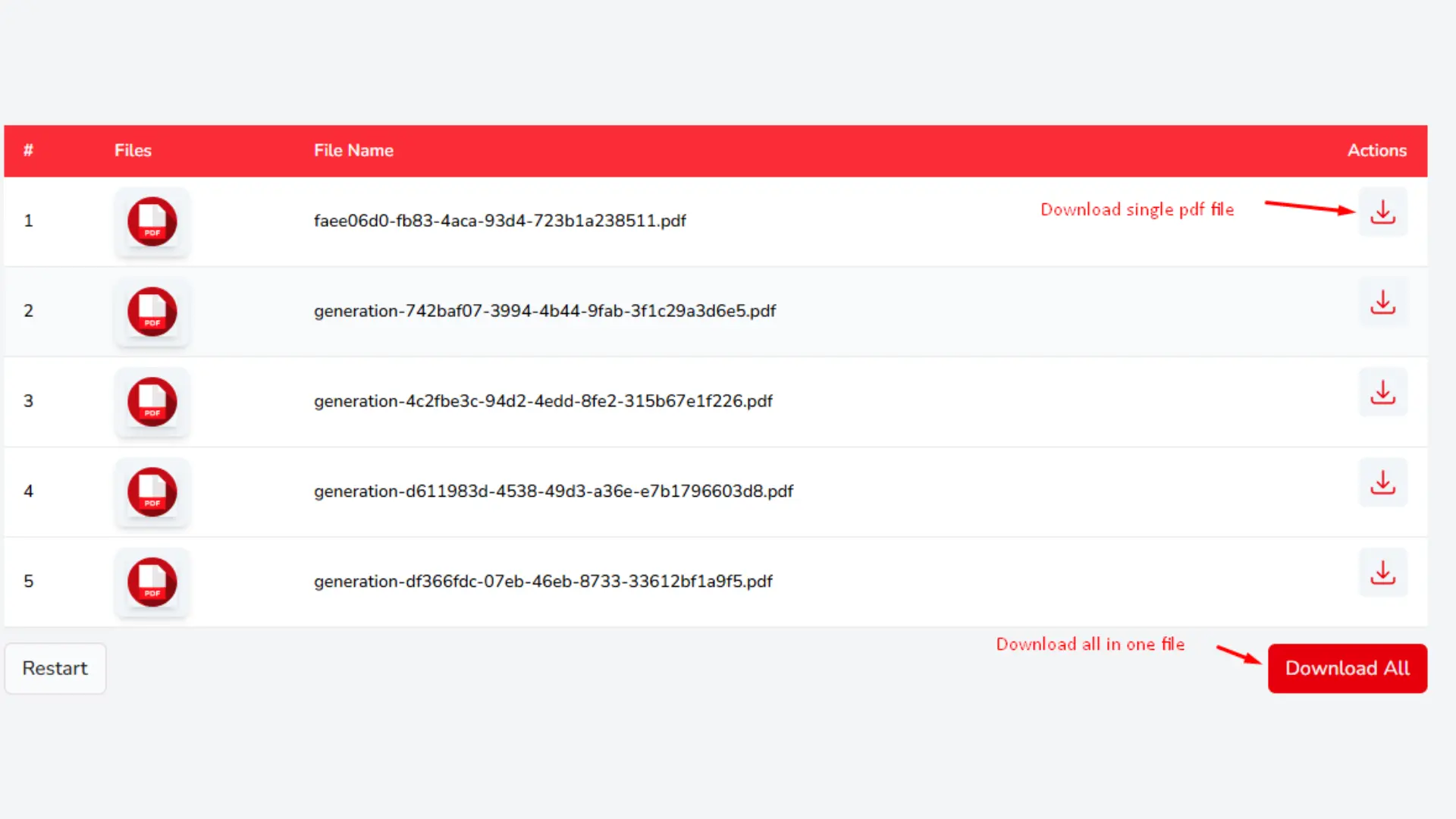
Your converted file is ready to save the moment processing is done. Download it directly to your device with one click. The PDF is yours, no watermark, no hidden fees, no forced signup to access the file.
Key Features of Our Pic to PDF Converter Online
Our Photo to PDF Converter is designed to make image to PDF conversion simple, fast, and reliable. Converting your image files to PDF files is what this tool is built for, and it does that one job very well. Here is what sets this picture to PDF converter free online apart from a generic conversion site.
Merge Multiple Images into One PDF
It's easy to get started. Import images straight from the web by uploading images from your device, drag & drop multiple files, copy & paste an image, or enter an online scan image URL. Our Image to PDF Converter supports JPG, PNG, WEBP, HEIC, BMP, GIF and TIFF formats and enables you to convert images to PDF easily online regardless of the image type. Converting personal images, scanned papers or business files – everything is done fast on your browser.
Multi Images Merge in Multi Formats
Want to merge multiple photos into one document? Upload your files and merge photos into one PDF in seconds. You can be confident each page will look just right. Whether it's constructing a report, sharing scanned receipts, or making a photo document – our application allows you to add images to PDF without sacrificing image quality.
Preview Before You Convert
Before the final PDF is generated, you can review every page one by one. This is where you catch the things that are easy to miss a page that loaded upside down, an image that is out of sequence, or a file that did not upload cleanly. Fixing it here takes five seconds. Fixing it after you have sent the PDF to someone does not.
Image Cropping Before Conversion
With the inbuilt crop tool you may remove unwanted borders and center the vital area of every image. If you are preparing a scanner photo to PDF, digitizing files, or cleaning up an internet scan image, cropping can help you create professional-looking PDF documents with regular margins and better readability.
Fast Processing and Secure Handling
Our PNG to PDF Converter is 100% browser-based. This means you can convert photographs to PDF online without transferring your files to third-party servers. Your photographs remain on your device throughout the process, enabling better privacy and speedier performance. If you want to scan image to PDF, scan image and convert to PDF or simply produce a PDF from photos, your files are safe from start to end.
Flexible PDF Download Options
Once the conversion is finished, download your files the way you need them. Save all images as one combined PDF or make separate PDF files for each image. No hidden fees, no registration or watermarks. Create a single PDF from several photographs, or convert one photo at a time. No matter what you choose, the free Photo to PDF Converter provides excellent quality results with just a few clicks.
Open Safari and visit solutionspedia.com. Tap Choose File and select your photo from the camera roll or tap Open Camera to take one on the spot. Hit Convert and download your PDF in under a minute, no app install required.
How to convert image files into a single pdf?
Open solutionspedia.com in your browser. Press Choose Files Button and pick all the images you want to combine you can upload up to 40 at once. Arrange them in the order you need, hit Convert, and download one merged PDF. Free, no signup, works on any device.
How to Convert JPG to PDF for Free?
Go to solutionspedia.com, press the Choose File Button and select your JPG. Click Convert and download your PDF instantly. No account, no watermark, no cost, just a clean PDF every time.
Is my data safe?
Completely. This tool runs entirely in your browser, which means your images never leave your device in the first place. Nothing is uploaded to any server, nothing is stored, and nothing is shared. Close the tab and everything is gone because it was only ever on your machine.
How Could I Preserve Image Quality in PDF?
Our converter keeps your images at their original resolution no compression applied during conversion. What you upload is what you get in the PDF. For a better approach, begin with the highest quality version of your image, the output will match it exactly.
What are the types of images that will be processed?
Our converter processes all standard types of images including JPEG, GIF, PNG, TIFF, BMP, and others. You can easily convert any of those to a PDF.
Which is the Best Photo to PDF Converter?
Our photo to PDF converter is one of the cleanest options out there free, no signup, and unlike most converters, it runs entirely in your browser so your photos never get uploaded to any server. Upload up to 40 images at once, merge them into one PDF, crop before converting, and download instantly. No watermarks, no hidden fees, no data stored anywhere.

 Word to PDF
 PDF to Word
 PNG to PDF
 JPG to Word
 Text to PDF
 Extract Text From PDF
 QR Code Scanner
 Compress Image
 Text Repeater