Scan QR Code Online Free
Most QR code apps only work through your phone camera. But what if the QR code is already saved as a picture? That's exactly where our tool makes life easier.
Just upload your QR image, a screenshot, a photo, or any picture file, and our QR code reader will extract the information instantly. It works like a photo scanner online free, built specifically for QR.
Here's what you can do:
1. Scan QR code from gallery: Upload directly from your phone or computer storage.
2. QR code scan from image: Paste or drag any image containing a QR code.
3. Scan QR code image: Works with PDFs, documents, or webpage screenshots.
4. Picture scanner: Pull text or URLs out of any saved QR photo.
5. Paste image URL: Drop any image link into the URL field, and the scanner fetches and reads the QR code automatically.
How to Use the QR Code Scanner
Using this tool is as simple as it gets:
Choose how you want to add your QR code five easy ways to get started:
Upload: click the button and select an image file from your device
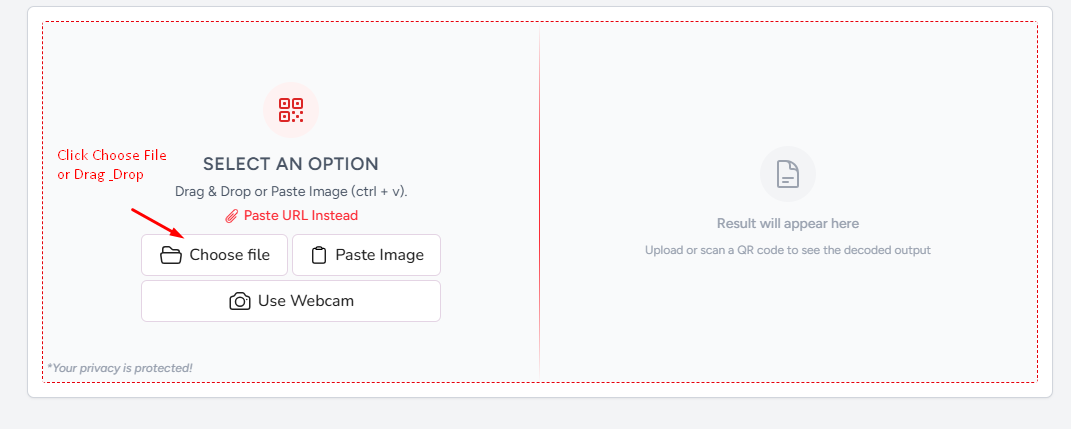
Drag & drop: drag any image file directly onto the scanner area.
Paste Image: press Ctrl+V / Cmd+V to paste an image straight from your clipboard.
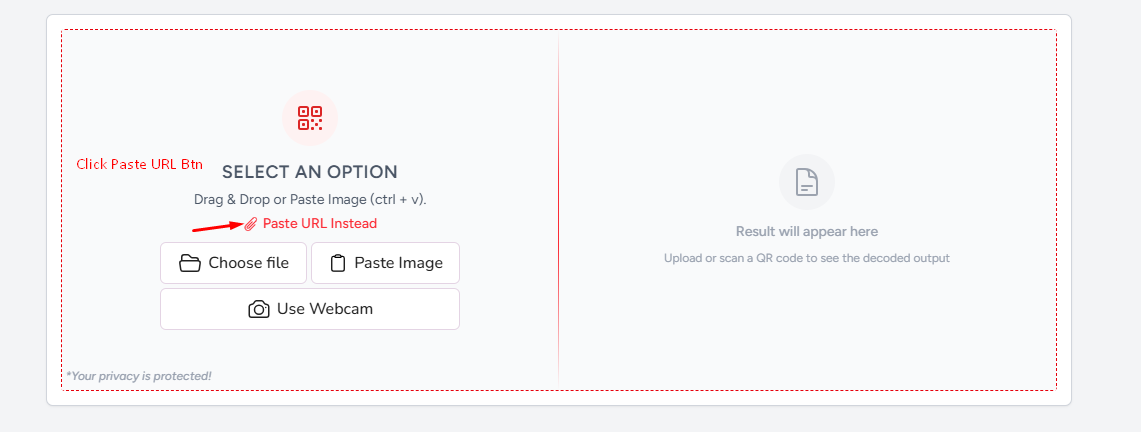
Paste image URL: drop a direct image link into the URL field and the tool fetches it automatically.
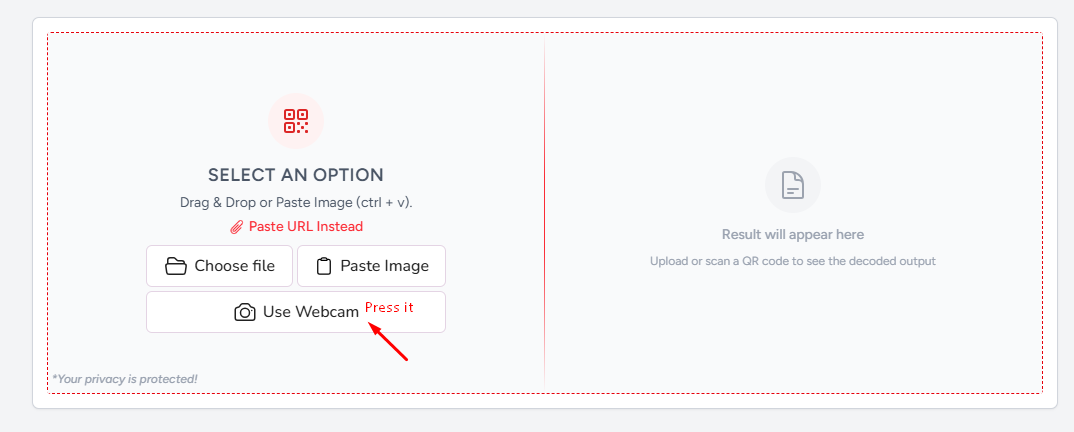
Webcam: click the camera option to scan a QR code live using your device's webcam.
Wait one second: the tool reads the image and runs it through the decoder.
Get your result: the QR code content appears as readable text instantly. Click Copy, download or restart button what you want with result.
That's all it takes. If you're testing a code you just created, this also works as a QR code scanner test to verify it encodes the right data before printing or sharing.
QR Code Decoder, Extract Text From Any QR Image
Imagine it as a QR to text Converter. After you upload a QR image, our QR code decoder scans the pattern and decodes the information stored in it, and it presents it as text, a web address, phone number, Wi-Fi password, contact info, or whatever else is stored in the code.
This process is also called decode QR code or decrypt QR code, both mean the same thing: to turn back the black and white square pattern into readable content. Our tool does it for you automatically, so you don’t need to understand the encoding process.
Works With Photos, Screenshots, and Gallery Images
A lot of people search for ways to scan QR code from gallery because they've saved a QR code as a photo but can't open it with a standard scanner app. This tool was built for exactly that.
You can upload:
- A QR code scan photo taken with your phone camera.
- A QR scanner photo you received over WhatsApp or email.
- A QR code photo downloaded from a website or document.
- A QR scanner from image that's embedded inside a poster, flyer, or brochure.
- Even a QR code scan sample to test if the format is readable.
As long as the QR code is visible in the image and reasonably clear, the tool will decode QR data without any trouble.
What Is a QR Code? (Q R Ka Full Form)
QR abbreviation means Quick Response. It was developed in 1994 by Denso Wave, a Japanese company, originally to track car parts during manufacturing. QR codes are everywhere today: restaurant menus, product packaging, business cards, payment screens and event tickets.
A QR code is a grid of black squares on a white background, and can store a lot more data than a standard barcode, which only contains numeric data. A QR code can store text, URL links, email addresses, location data, and even entire contact cards.
QR Code vs Barcode: What's the Difference?
Both QR codes and barcodes store machine-readable information, but they work quite differently. A barcode is one-dimensional, it uses vertical lines and can only hold around 10 to 30 characters, making it suitable for simple data like product prices and inventory numbers. A QR code, on the other hand, is two-dimensional, its square grid pattern can store up to 7,000 characters, which is why it's used for richer data like URLs, Wi-Fi passwords, and payment details.
Why Use an Online QR Code Scanner?
There are many apps out there, but an online tool has some clear advantages:
- No installation: open browser and start scanning.
- Works on any device: phone, tablet, laptop, or desktop.
- Handles saved images: not just live camera feeds.
- Free forever: no subscription or hidden fees.
- Private: uploaded images are processed and discarded; nothing is stored.
Whether you need a quick QR code scan or want to upload QR codes for decoding regularly, this tool gets the job done without any friction.
Try a QR Code Scan Sample
Not sure if the tool works? Test it yourself. Find any QR code online a QR code scanner images result from a search, a saved screenshot, or a QR code scan sample and upload it here. The result will appear in under a second.
If you've created your own QR code and want to verify it, this is the fastest way to run a QR code scanner test without needing a separate app.

 Word to PDF
 PDF to Word
 PNG to PDF
 JPG to Word
 Text to PDF
 Extract Text From PDF
 QR Code Scanner